Unblocking the UI: Web Workers in Angular Applications
The Problem: The App Freezes, The Client Blames You
You have a beautiful list component. It displays thousands of items and supports real-time search, custom sorting, and multiple simultaneous filters. Works great on your Mac M67 AI Ultra. Ship it.
Then a user opens it on a mid-range Android device and the typing cursor freezes for a second after every keystroke.
So you think "Okay, I will debounce the filter input, that should fix it." You add a 300ms debounce and deploy. Now the user can write without mid-type freeze, but the results take time to compute and your loading spinner does not spin!
Congratulations — you have changed one bug for another. Progress!
But Why!?
JavaScript and the browser rendering engine share the same thread and it has just a limited budget that has to be shared between different tasks. Every millisecond your JavaScript code spends computing data is a millisecond it can't be spent painting frames, processing input events, or running Angular's change detection.
More technically, the browser's rendering engine operates on a strict 16ms budget per frame (60fps). Any synchronous task that blows past that budget creates visible jank. When working with large lists, complex filters, or heavy computations, it's easy to exceed that budget.
In cases like this, moving heavy computation to a Web Worker can be the correct solution.
Web Workers in 60 Seconds
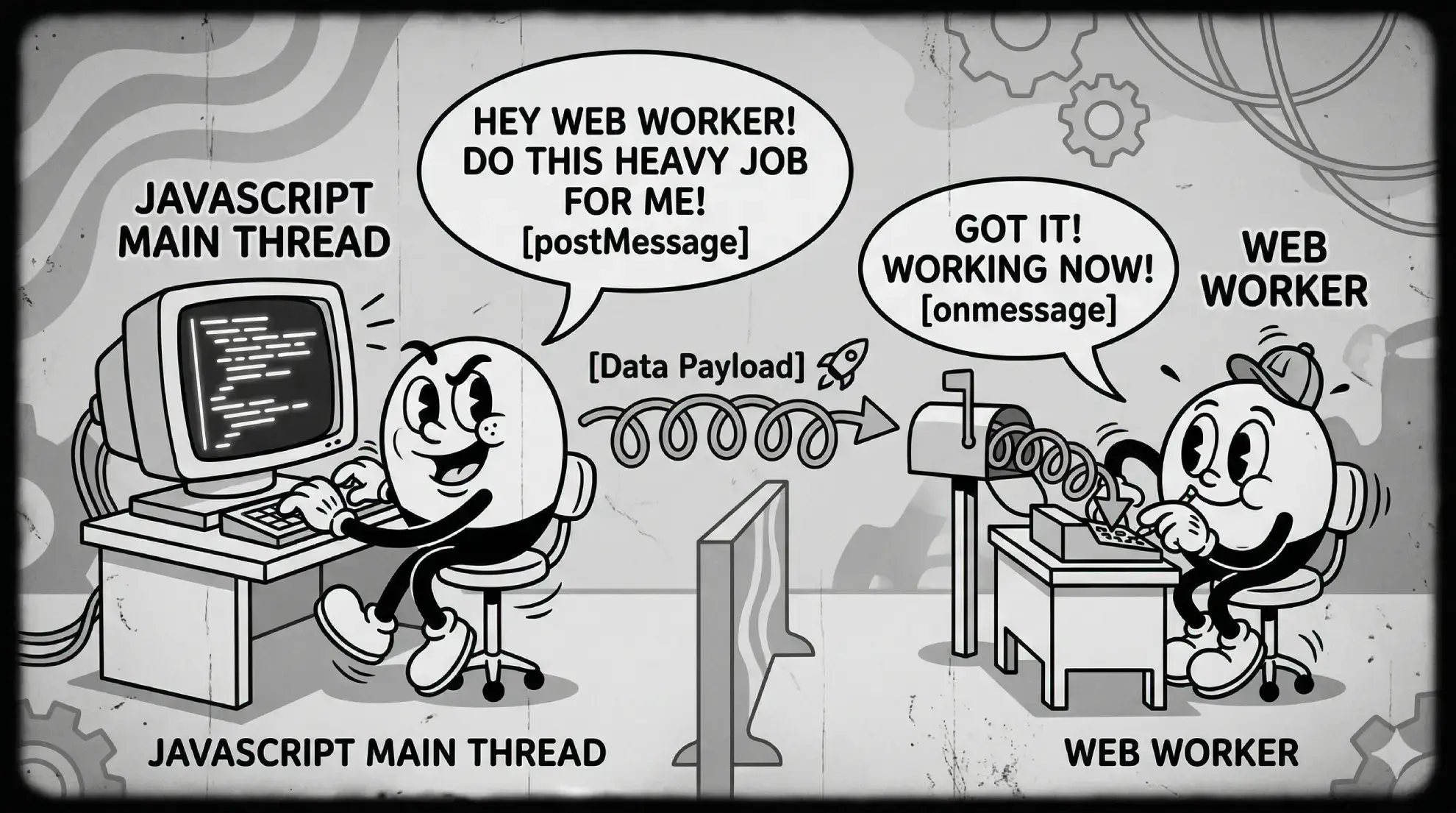
A Web Worker is a JavaScript context that runs in a separate thread. It:
- Has its own event loop — it can't block the main thread
- Has no access to the DOM —
document,window,Angular Componentsdon't exist there - Communicates via
postMessage/onmessage— messages are copied using the Structured Clone Algorithm - Supports
importwhen created as an ES module worker ({ type: 'module' })
The browser-side API is simple:
// main thread
const worker = new Worker(new URL('./heavy.worker', import.meta.url));
worker.postMessage({ items: bigArray, searchText: 'foo' });
worker.onmessage = ({ data }) => console.log('result:', data);

// heavy.worker.ts
addEventListener('message', ({ data }) => {
  const result = data.items.filter((item) => item.name.includes(data.searchText));
  postMessage(result);
});
Alright, Now Make It Reusable
There are two things that you have to take into consideration when implementing Web Workers in general:
- Each worker needs resources to run. Spawning a worker is not free, it will take some RAM to live even when idle.
- A worker can't access your application's scope. You can only pass data through messages. This means that you have to design your worker in a way that it can receive all the necessary data to do its job through messages.
With that in mind, you can create either:
- A dedicated worker for each use case (e.g., a
FilterNameWorkerthat only does filtering of names in an object that looks like{name: string}) or - A generic worker that accepts serializable functions and data as input.
The first is easier but less flexible; the latter is more complex but reusable across different use cases. We will focus on the second one here.
Wait, You Can Send a Function Through a Message?
A JavaScript Function object has a constructor that can create a new function from a string. It has a toString() method that returns the source code of the function as a string.
This allows you to serialize it and reconstruct it with something like:
const mySayMyNameFn = (myName) => {
  console.log(`Hello ${myName}`);
};

const serializedFn = mySayMyNameFn.toString();

const reconstructedFn = new Function(`"use strict"; return (${serializedFn})`)();

reconstructedFn('Saninn'); // See the console log!
:warning: DO NOT DO THIS WITH UNTRUSTED INPUT. If not used correctly it can expose your application to XSS attacks.
You can use this technique to send functions to a Web Worker to work with your data
// In your application code
const filterFn = (item: Item) => item.value > 100;
worker.postMessage({
  items,
  filterFn: filterFn.toString(), // Serialize the function
});

// In the worker
addEventListener('message', ({ data }) => {
  const filterFn = new Function(`"use strict"; return (${data.filterFn})`)(); // Reconstruct the function
  const result = data.items.filter(filterFn);
  postMessage(result);
});
Great, Now Here Come the Gotchas

1. The this Keyword
When you reconstruct a function in a worker, it can't reference your service/component this from its call site. If you write:
readonly threshold = 100;

callWorker(): void {
  const filterFn = (item: Item) => item.value > this.threshold; // <-- `this` is not what you expect in the worker
  worker.postMessage({
    items,
    filterFn: filterFn.toString(), // Serialize the function
  });
}
When .toString() serializes this function and a new Function(fnStr)() reconstructs it in the worker, this is undefined (or the global self object). The filtered value is gone.
Fix: pass dependencies explicitly through the message itself via a context object:
interface WorkerMessage {
  items: Item[];
  filterFn: string; // serialized function
  context: { threshold: number }; // explicit context for dependencies
}

callWorker(): void {
  const filterFn = (item: Item, context: WorkerMessage['context']) => item.value > context.threshold;
  worker.postMessage({
    items,
    filterFn: filterFn.toString(), // Serialize the function
    context: { threshold: this.threshold }, // Pass dependencies explicitly
  });
}

// In the worker:
addEventListener('message', ({ data }) => {
  const { items, context, filterFn: filterFnSource } = data;
  const filterFn = new Function('"use strict"; return (' + filterFnSource + ')')();
  const filtered = items.filter((item) => filterFn(item, context)); // Pass context to the filter function
  postMessage(filtered);
});
The context object is a plain JavaScript object — and it can hold anything the Structured Clone Algorithm accepts: numbers, strings, booleans, arrays, plain nested objects, and lookup maps. This makes it a natural container for everything the filter needs: locale strings, threshold values, status maps, feature flags.
What it cannot hold — and this is the catch — are functions. The Structured Clone Algorithm silently drops function values when copying a message. If you put a helper function in your context object and postMessage it, the worker receives undefined for that key, not the function.
That becomes a problem the moment your filter logic needs to call a shared utility. See Section 4 below for the pattern to handle it.
2. Bundler Helper Injection
This one is sneaky, appears exclusively in production, and patiently waits for your most important demo with the CEO before striking.
Given this code:
const merged = { ...obj1, ...obj2 };esbuild (and Webpack before it) rewrites this to use an internal helper function:
// What esbuild actually emits:
const merged = __spreadValues(__spreadValues({}, obj1), obj2);
The helper function __spreadValues is defined somewhere else in the bundle. It is not available inside a fresh worker context. When you serialize a function that uses object spread and send it to a worker, the worker throws ReferenceError: __spreadValues is not defined.
The same problem applies to:
_WEBPACK_IMPORTED_MODULE_*— Webpack module references__spreadProps— Property spread on classes- Any other bundler-injected identifier
Fix: avoid object spread in functions that will be serialized. Use Object.assign() instead:
// BAD — esbuild rewrites this to __spreadValues
const update = { ...existingItem, status: 'done' };

// GOOD — Object.assign survives serialization unchanged
const update = Object.assign({}, existingItem, { status: 'done' });
For imports — they flat-out don't work in serialized functions. If your filter function calls someUtility() imported from @company/utils, the worker has no idea what that reference is. Pass utilities as serialized strings too, or include them inline:
// Serialize dependencies alongside the main function
function serializeWithDependencies(fn: Function, dependencies: Record<string, Function> = {}): string {
  const depStrings = Object.entries(dependencies)
    .map(([key, value]) => `const ${key} = ${value.toString()};`)
    .join('\n');
  return `${depStrings}\nreturn (${fn.toString()});`;
}

// Usage:
const serialized = serializeWithDependencies(filterFn, {
  formatDate, // dependency available in worker
  parseStatus, // another dependency
});
3. Catch It Before It Reaches the Worker
Debugging serialization errors is painful — they often surface as cryptic ReferenceErrors deep inside an unattributed script, usually at 4:45pm on a Friday. A proactive validation step before sending to the worker saves significant time:
const FORBIDDEN_PATTERNS = [
  '_webpack_', // Webpack module references
  'this.', // Context references
  '__spreadProps', // esbuild spread helper
  '__spreadValues', // esbuild spread helper
];

function validateSerializedFunction(fn: string, tag: string): void {
  for (const pattern of FORBIDDEN_PATTERNS) {
    if (fn.includes(pattern)) {
      throw new Error(`[${tag}] Serialized function contains forbidden pattern "${pattern}". ` + `Avoid object spread operators (use Object.assign) and ensure ` + `all dependencies are passed via context, not imports.`);
    }
  }
}

// Call before postMessage:
validateSerializedFunction(filterFn.toString(), 'ListFilter');
This gives you a clear, early error in development before the function reaches the worker context where the error would be much harder to diagnose.
Wait, Wait, Do I need to repeat myself?
Keeping your filter functions isolated and pure will eventually leave you with a lot of repetitive code. When we see that, we like to create helper functions that can be shared across different workers and different filter/sort functions. The problem is that these helpers also need to be serialized and passed through the context object. As a last step of this post, let us see how to do that in a way that keeps your code DRY and maintainable.
The problem
Your filter is getting more complex. Instead of a simple comparison, it now calls a shared utility:
// normalize is imported from a module — seems fine locally...
import { normalize } from '@company/utils';

const filterFn = (item: Item, context: WorkerContext) => normalize(item.status) === normalize(context.targetStatus);
When this function is serialized to a string and reconstructed inside the worker with new Function, normalize doesn't exist in the worker's isolated scope. You'll get a ReferenceError: normalize is not defined.
Design rule: call sibling helpers through context, never by name
The fix is the same as with data dependencies: pass helpers through the context object too. However, because functions are silently dropped by postMessage, you must also serialize them to strings.
The key design rule is:
Every helper function must accept
contextas a parameter and call any sibling helpers viacontext.siblingFn()— never by its own module-scoped name.
This is what makes the whole system work. When the function is reconstructed in isolation inside the worker via new Function, the only "scope" it has access to is its own arguments. context is one of those arguments, so it works. A bare call to normalize(...) would fail because normalize doesn't exist in worker scope.
Here's a concrete example from a real production list component:
// filterByOrColumnValues calls context.resolveExportValue — not resolveExportValue directly.
// When reconstructed in the worker, `context` is the only "scope" available.
function filterByOrColumnValues<T>(item: T, columnIndex: number, texts: string[], context: Omit<WorkerContext<T>, 'filterByOrColumnValues'>): boolean {
  const value = context.resolveExportValue({
    // <-- via context, not a direct call
    config: context.column.exportConfig[columnIndex],
    item,
    workerContext: context,
  });
  return texts.some((text) => value?.toString().toLowerCase() === text.toLowerCase());
}
Build the context object
Group all helpers into a single plain object. Constants and plain-object config are fine alongside functions — only functions need the serialization treatment below.
function normalizeStatus(status: string): string {
  return status.trim().toLowerCase();
}

function matchesSearchText(item: Item, text: string, context: WorkerContext): boolean {
  return context.normalizeStatus(item.status).includes(context.normalizeStatus(text));
}

// Collect all helpers (and any constants) into one context object
const workerHelpers = {
  normalizeStatus,
  matchesSearchText,
  EMPTY_VALUE: '__empty__', // plain constants travel as-is
};
You can also derive a TypeScript type directly from the object so your filter functions have full autocomplete and type-safety:
type WorkerContext = typeof workerHelpers;Serialize functions before sending
When building the message, iterate over the context object and convert every function value to a string. Everything else passes through unchanged.
function serializeWorkerContext(context: Record<string, unknown>): Record<string, unknown> {
  return Object.fromEntries(Object.entries(context).map(([key, value]) => [key, typeof value === 'function' ? value.toString() : value]));
}

worker.postMessage(
  JSON.stringify({
    items,
    filterFn: filterFn.toString(),
    context: serializeWorkerContext(workerHelpers),
  })
);
Reminder: run each serialized function string through
validateSerializedFunctionfrom Section 3 before sending. If a helper inadvertently contains object spread or a module reference, you want a loud error in development — not a silent failure inside the worker.
Reconstruct functions in the worker
On the receiving end, detect serialized function strings and reconstruct them with new Function. A reliable heuristic: if a string value contains => or starts with function, it was a function.
addEventListener('message', ({ data }) => {
  const message = JSON.parse(data);

  // Reconstruct function values from their string representations
  const context = Object.fromEntries(Object.entries(message.context as Record<string, unknown>).map(([key, value]) => [key, typeof value === 'string' && (value.includes('=>') || value.trimStart().startsWith('function')) ? new Function(`"use strict"; return (${value})`)() : value]));

  const filterFn = new Function(`"use strict"; return (${message.filterFn})`)();
  const result = message.items.filter((item: unknown) => filterFn(item, context));
  postMessage(JSON.stringify(result));
});
Real-world example: webWorkerContext
In a production generic list component, this pattern is formalized into a webWorkerContext constant that bundles all reusable helpers:
// All helpers are standalone module-level functions.
// Each one receives `context` and calls siblings through it — never by direct name.
function resolveExportValue<T>(params: { config: ExportConfig<T>; item: T; workerContext: WorkerContext<T> }): unknown {
  /* ... */
}
function normalizeExportValue(value: unknown): string {
  /* ... */
}
function filterByOrColumnValues<T>(item: T, columnIndex: number, texts: string[], context: WorkerContext<T>): boolean {
  /* ... */
}
function sortByColumnValues<T>(a: T, b: T, columnIndex: number, ascending: boolean, context: WorkerContext<T>): number {
  /* ... */
}

// Bundled into a single context object
const webWorkerContext = {
  resolveExportValue,
  normalizeExportValue,
  filterByOrColumnValues,
  sortByColumnValues,
  FILTER_EMPTY_VALUE: '__empty__',
};

// TypeScript gives us the exact shape for free
type WorkerContext<T> = typeof webWorkerContext & {
  column: { exportConfig: Record<number, ExportConfig<T>> };
};
Before sending, the component merges webWorkerContext with per-request config (e.g., column export configs) and any caller-provided context extensions. The service layer then serializes all function values. The caller can safely extend webWorkerContext with their own domain helpers — as long as those helpers also call siblings through context — and everything composes transparently.
What not to do
// ❌ Calling a module-scoped function by name inside a serialized function
const filterFn = (item: Item, ctx: WorkerContext) => normalizeStatus(item.status) === ctx.targetStatus; // ReferenceError: normalizeStatus is not defined (surprise!)

// ❌ Putting class instances in context — methods are stripped by Structured Clone
const ctx = { service: new MyService() }; // worker receives { service: {} } — a hollow shell of what it once was

// ✅ Pure functions that only reference their own arguments and `context`
const filterFn = (item: Item, ctx: WorkerContext) => ctx.normalizeStatus(item.status) === ctx.normalizeStatus(ctx.targetStatus);
What Have We Actually Built Here?
You now have a working generic worker infrastructure: functions travel as serialized strings, dependencies ride along in a context object, bundler helpers are detected before they cause a production incident, and sibling utilities call each other through context rather than by name — because they have no other choice. You can stop here and ship something useful.
...unless
You are probably asking yourself questions like: Where does the worker actually live? Do you create it inline? In a service? At module level? How many workers is too many? And what happens when you need the same heavy computation in five different components?
We will check that in Part 2 looking at 2 patterns — static long-lived workers and dynamic on-the-fly workers — along with the Angular-specific code to make them feel like first-class citizens. It will probably-maybe show something about SSR too, who knows.
See you there.